




Liderlik Tablosu
-
Doğan Kurban
Üye45Puan16.364Toplam İleti -
Cem Boneval
Blogger26Puan16.839Toplam İleti -
Gürkan Çakıroğlu
Üye16Puan8.938Toplam İleti -
Hakan Saraylı
Üye15Puan2.255Toplam İleti



Popüler İçerikler
11-02-2016 tarihinde, tüm alanlarda en yüksek itibara sahip içerik gösteriliyor
-
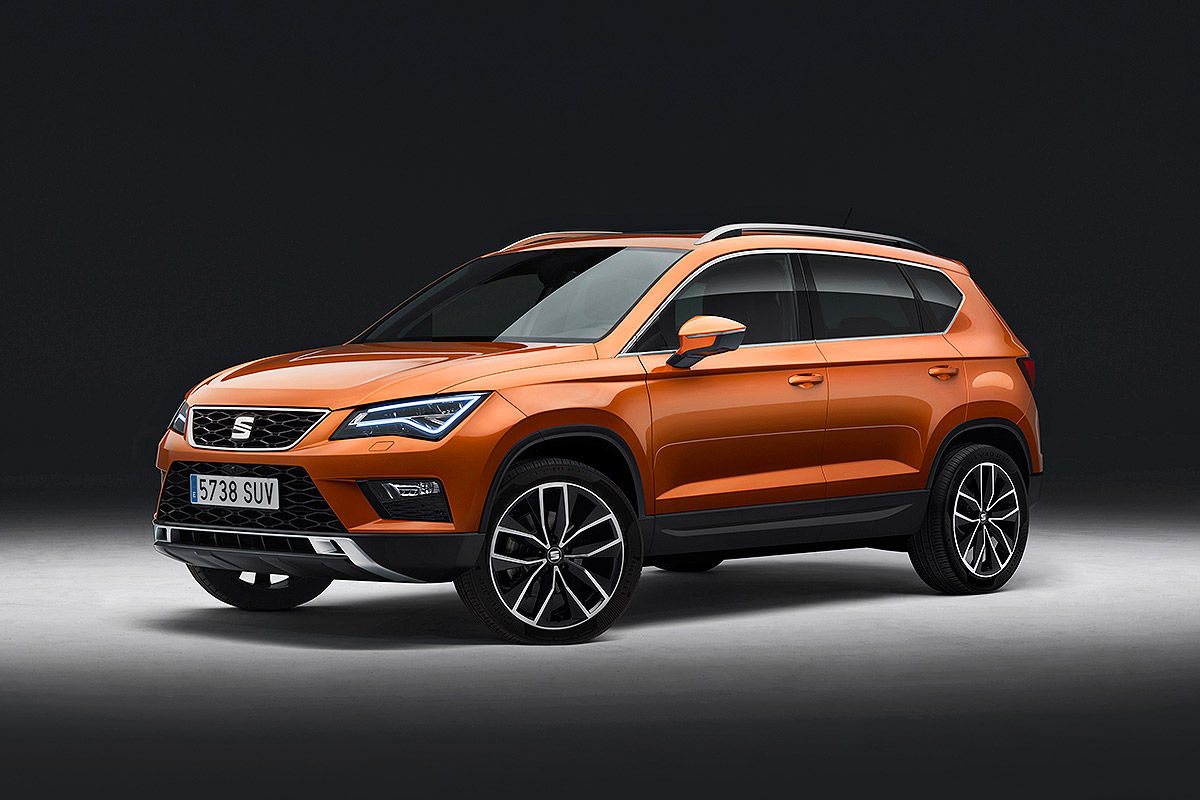
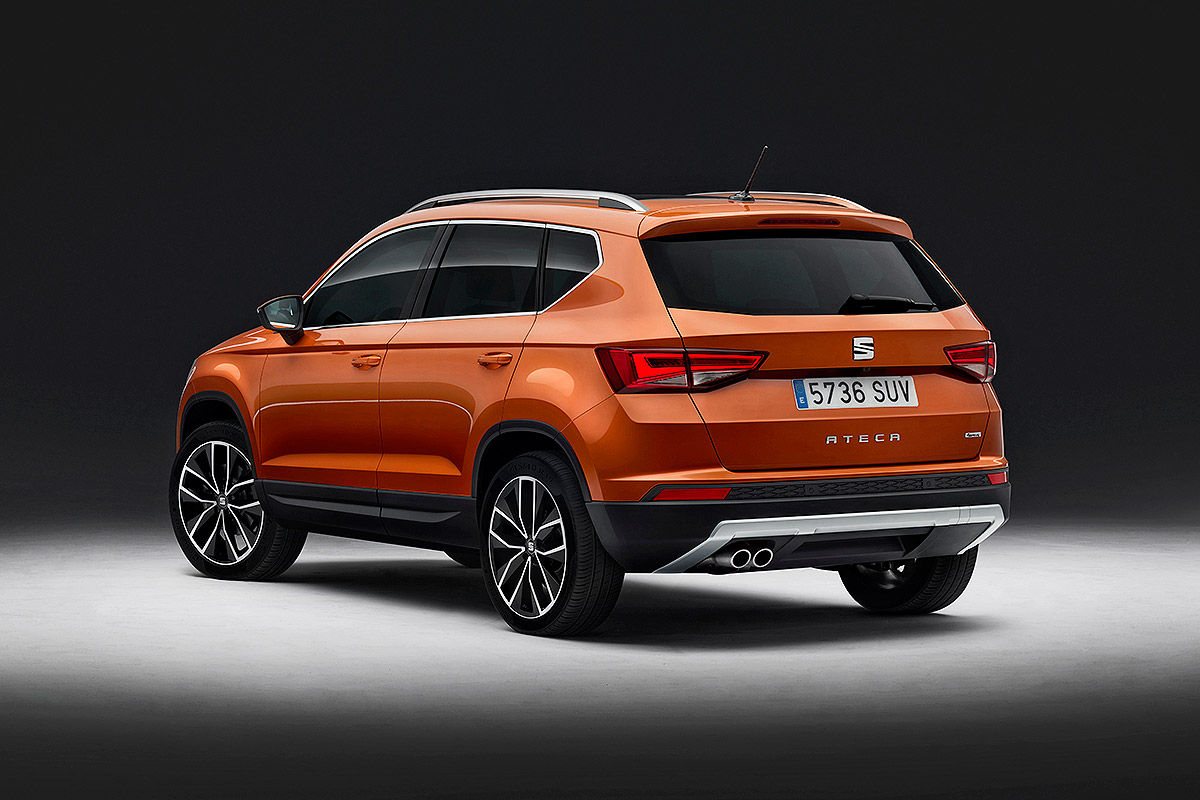
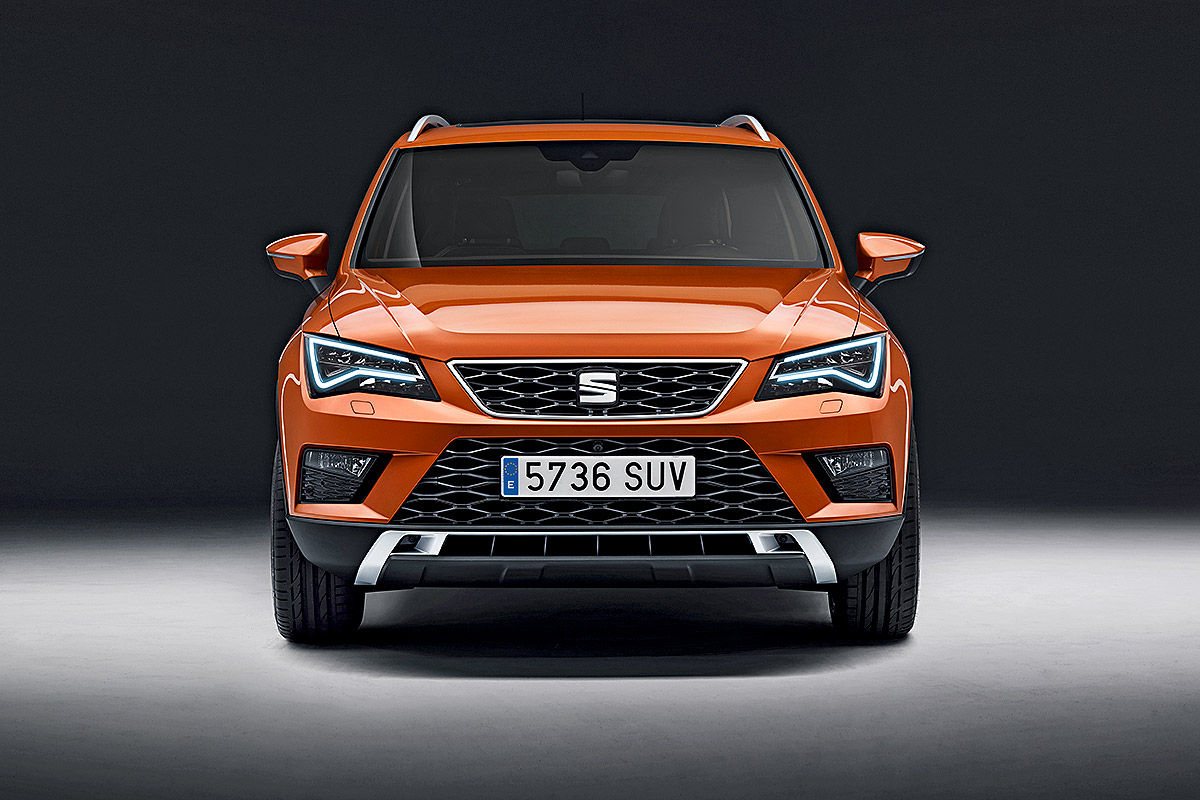
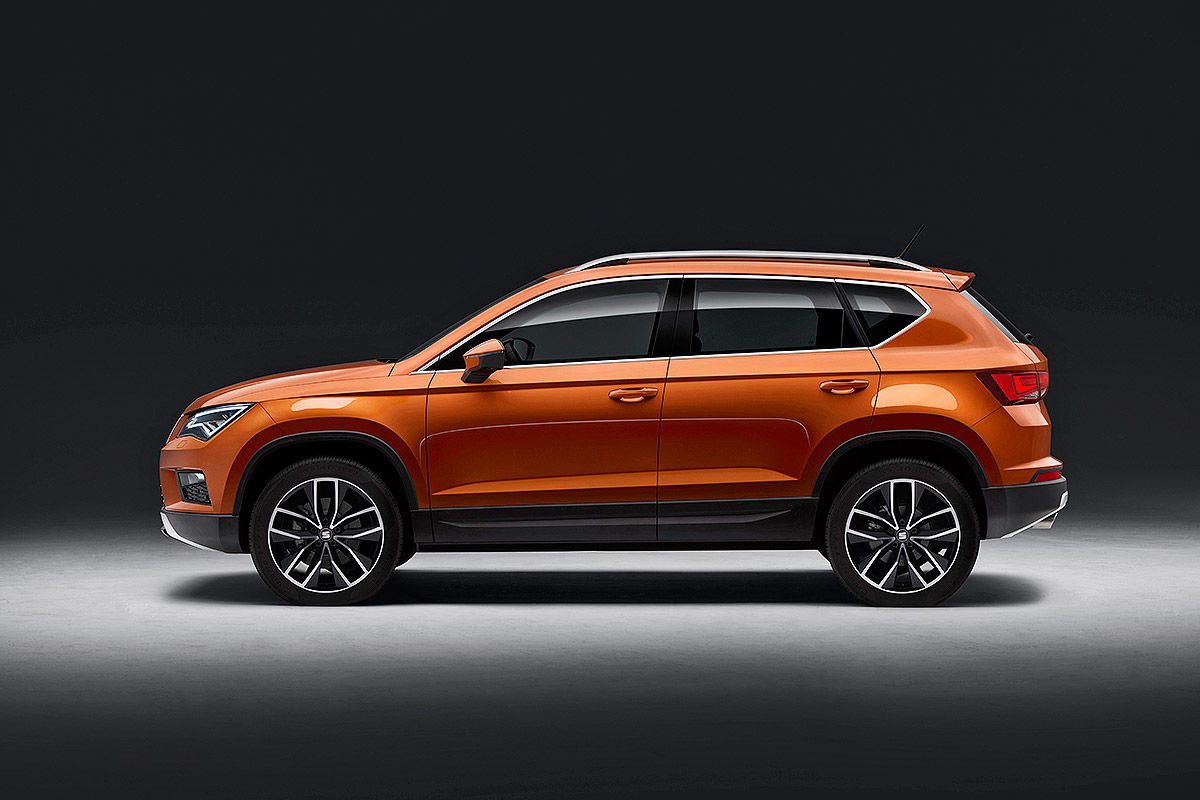
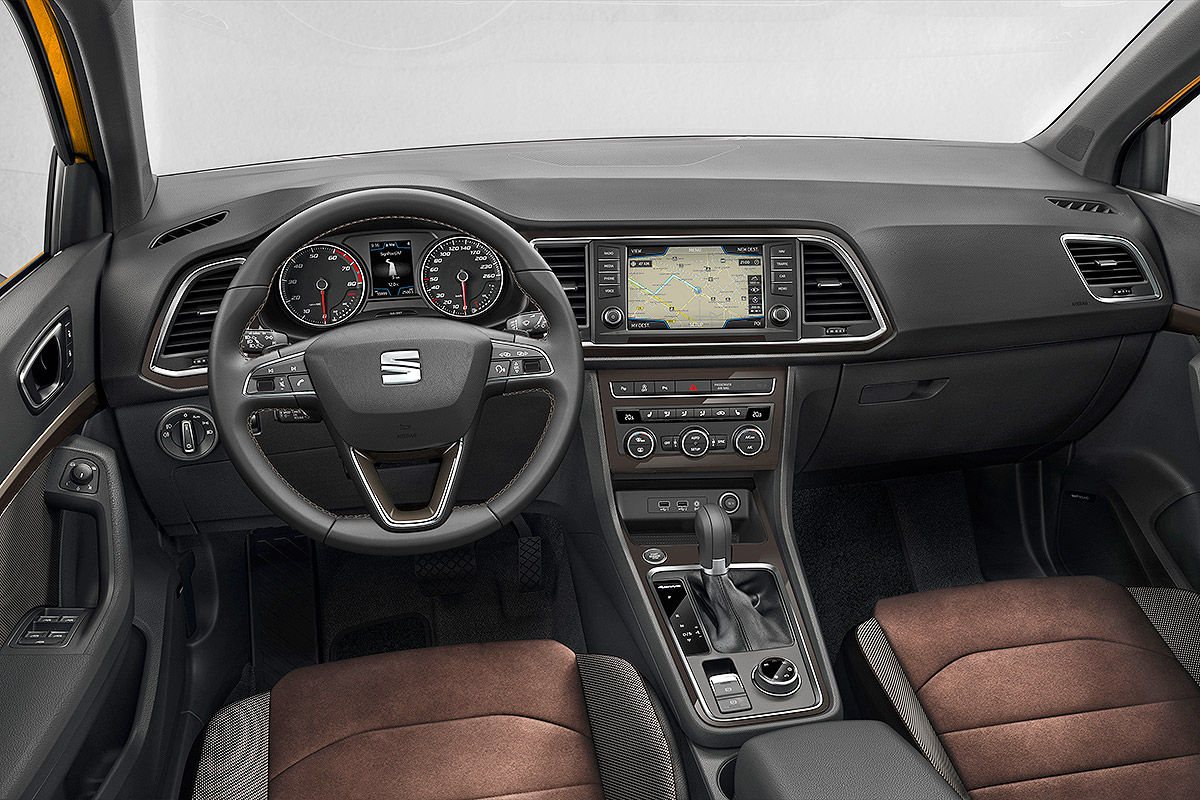
6 puanGenevre'den önce burada... Seat sonunda ilk modeli ile SUV pazarına giriyor. Saragossa'daki bir bölge adına ithafen Ateca olarak adlandırılan model Tiguan esintileri taşısa da bence kendine özgü, temiz, dinamik ve dengeli bir çizgisi var. Haliyle tipik Seat tasarım öğeleri var. 4,36 m'lik model yaz sonuna doğru dört motor seçeneği, önden çekiş veya AWD ve manüel veya DSG opsiyonları ile satışa sunulacak. 1,6L 115 PS, 2,0L 150PS ve 190PS dizeller yanında 1.0 TSi 115 PS ve 1.4TSi 150PS şimdilik motor gamını oluşturuyor. Bol teknolojili iç mekan özellikleri yüksek oturma pozsiyonu ve 510L bagaj hacmi ile birleşiyor. iOs ve Android uyumlu indüktif şarj özellikli 20 cm ekranlı trafik yoğunluk uyarılı gelişmiş mutimedya sistemi dikkat çekerken, dileyenler LED farlı kullanabiliyor. Qashqai ile rekabete girmesi beklenen modelin fiyatı henüz belli değil. Hoş görünüyor.
 6 puan
 -
Kaliperleri boyadık bugun önce 2 kat beyaz üstüne 2 kat kırmızı made in Yahya [emoji3]5 puan
-
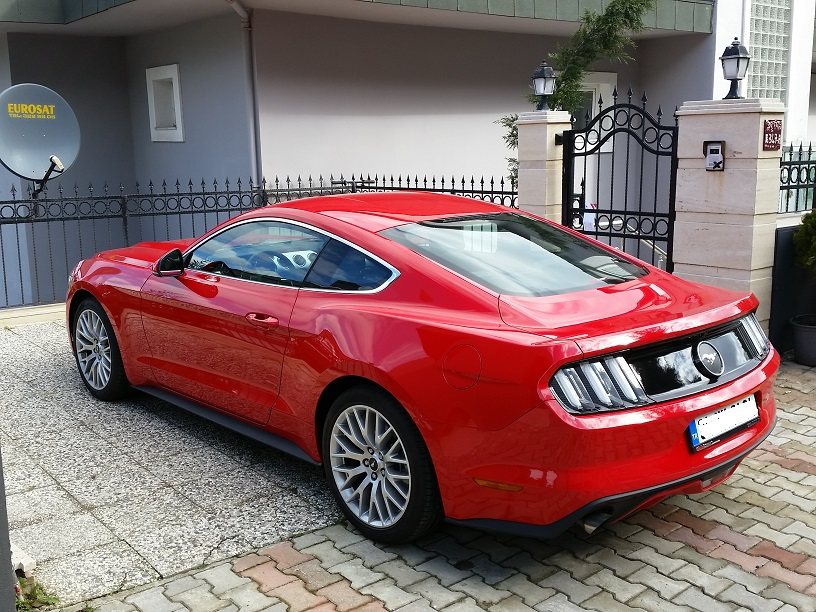
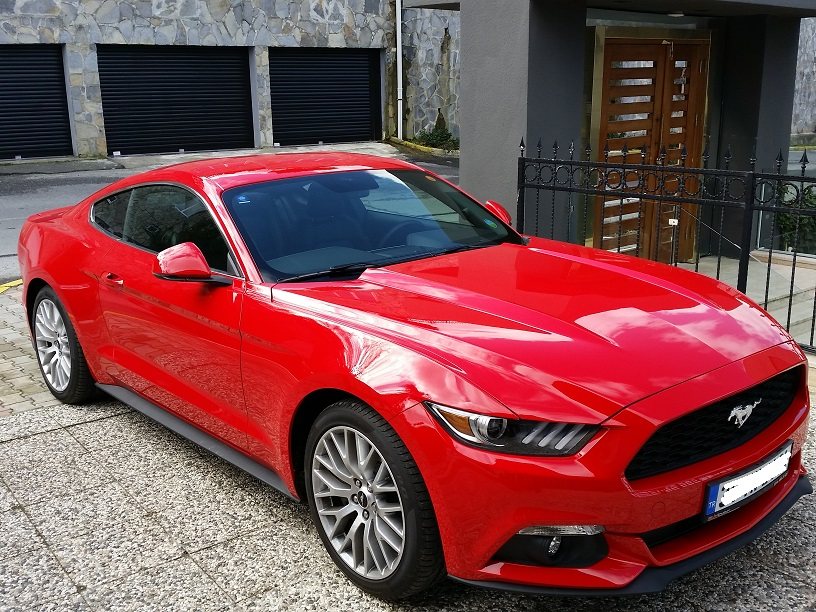
Selamlar arkadaşlar, Bu forumu dün akşam "acaba Turkiye'de bir Mustang forumu var mıdır" diye araştırırken buldum, görüyorum ki doğru yeri bulmuşum, üstadlar burada. Ben uzun bir araştırmadan sonra geçen hafta Kırmızı 2015 Mustang EB aldım ve kullanmaya başladım. Gray market Almanya'dan ithal, Avrupa versiyon. Daha önce hiç bu tür bir otomobilim olmadı, çocuklu hayalimdi kısmetmiş, eşimin de onayıyla 45.yaş günümde almaya karar verdim. Henüz 200km bile binmedim, o yüzden sürüş konusunda bir şeyler yazmam için çok erken. Ama şunu yazmadan geçemeyeceğim, arabayı alıp eve gelirken site kapısında durdum, fren balatalarından duman çıkıyordu. Ben panikledim ama güvenlik görevlisi otomobil meraklısıymış, "Korkma abi, hayırlı olsun dumanı o, güle güle kullan" diyerek rahatlattı beni. "Lüks otoyu aldı eve giderken yaktı" diye gazetelere haber olacağım diye ödüm koptu. Sizlere ilk sorumu sormak istiyorum, bilen varsa çok memnun olurum. owner.ford.com linkinden otomobil kaydımı yaptırdım, ve Sync 2 için bir terfi paketi olduğunu söyledi ama bunun Sync 3 olup olmadığını bilmiyorum, 681mb oldukça büyük. İndirdim ama henüz yüklemedim. Navigasyon falan gayet güzel çalışıyor şu anda, olur da yenisini yüklersem sorun olur diye sizlere danışayım önce diye düşündüm. Bu konuda fikrinizi alabilir miyim?
 5 puan
 -
@Gürkan Karagöz aracınız hayırlı olsun, güle güle kazasız, belasız kullanırsınız. Bugün 42.nci yaş günüm umarım 45.nci yaş günüm sizinki gibi olur3 puan
-
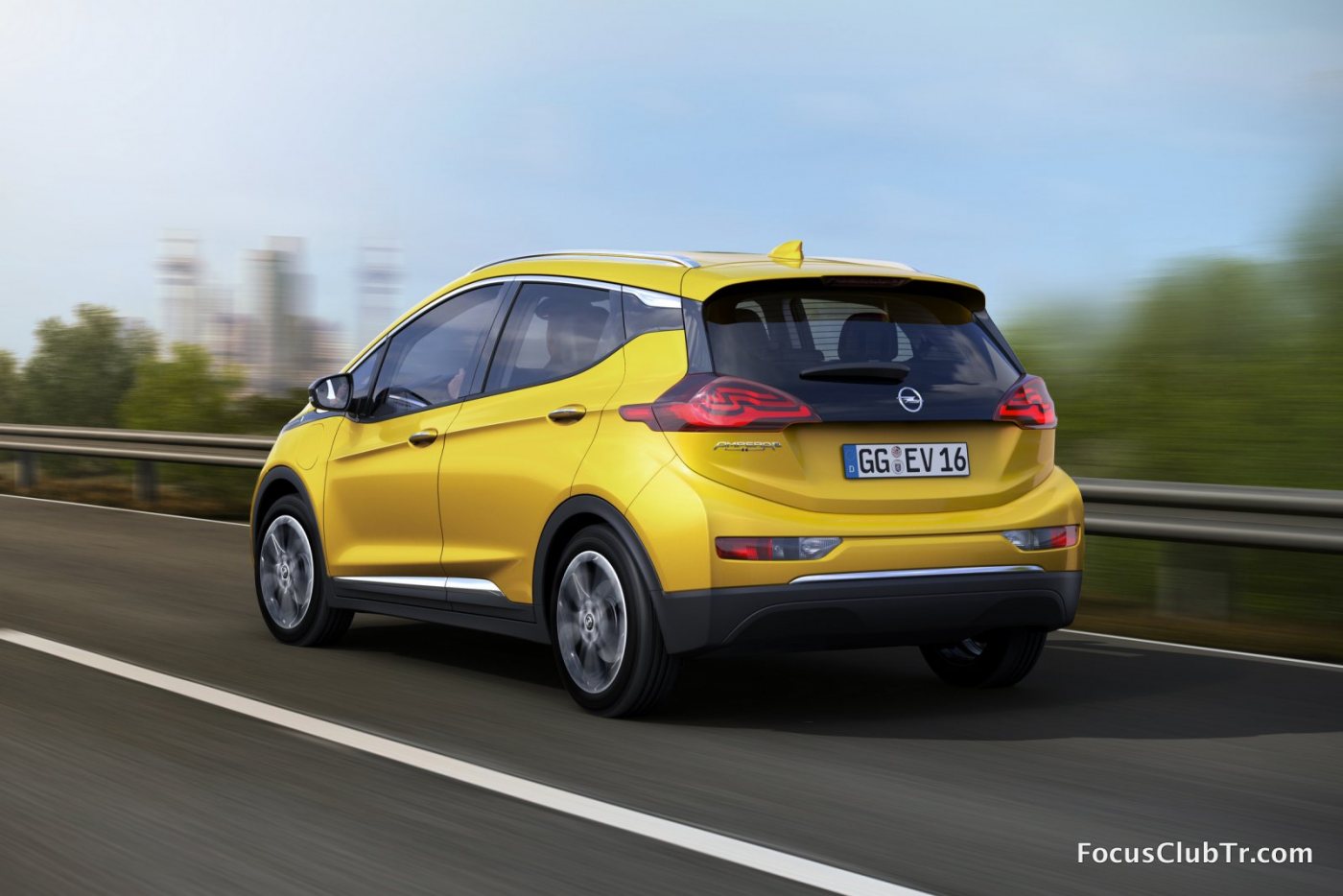
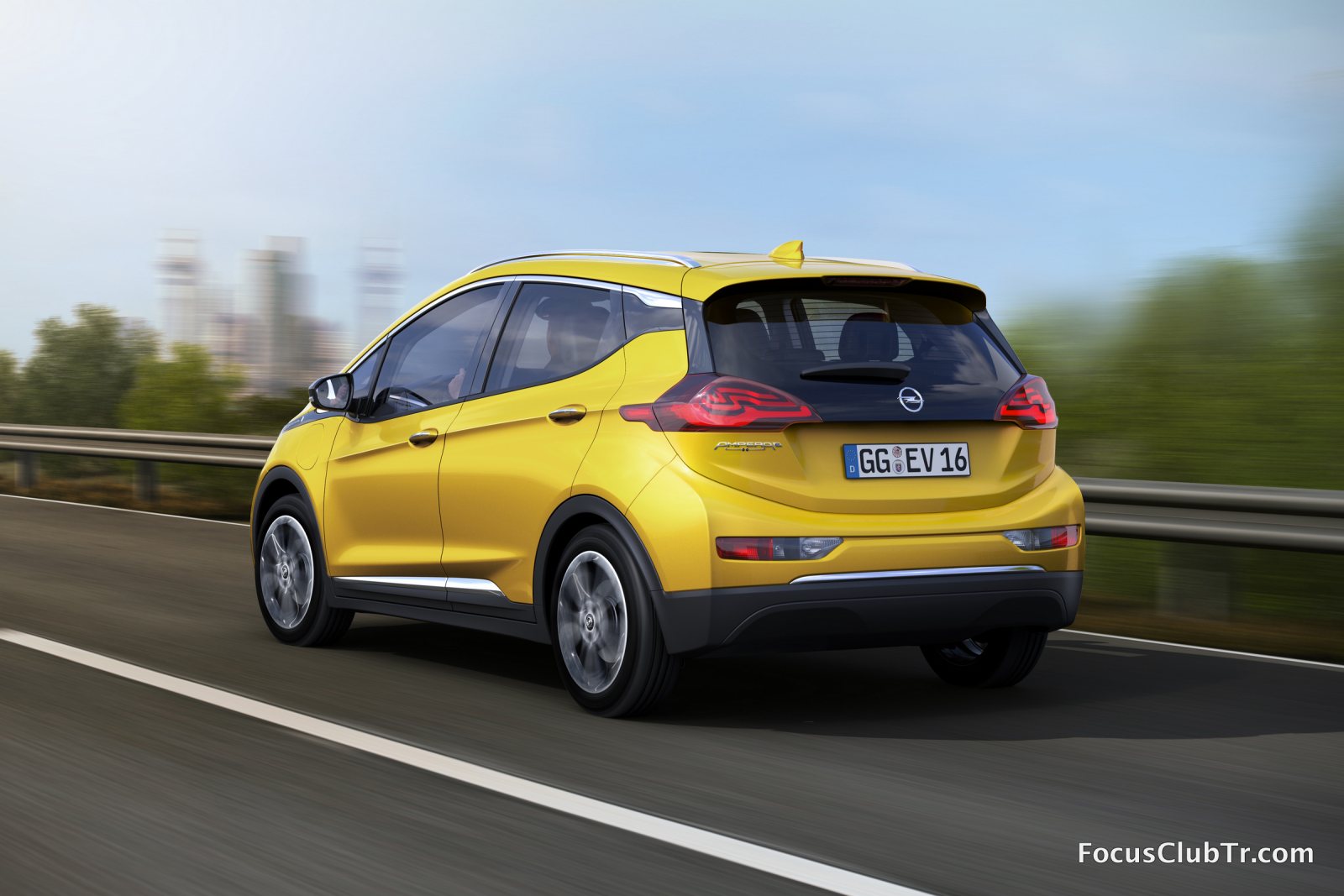
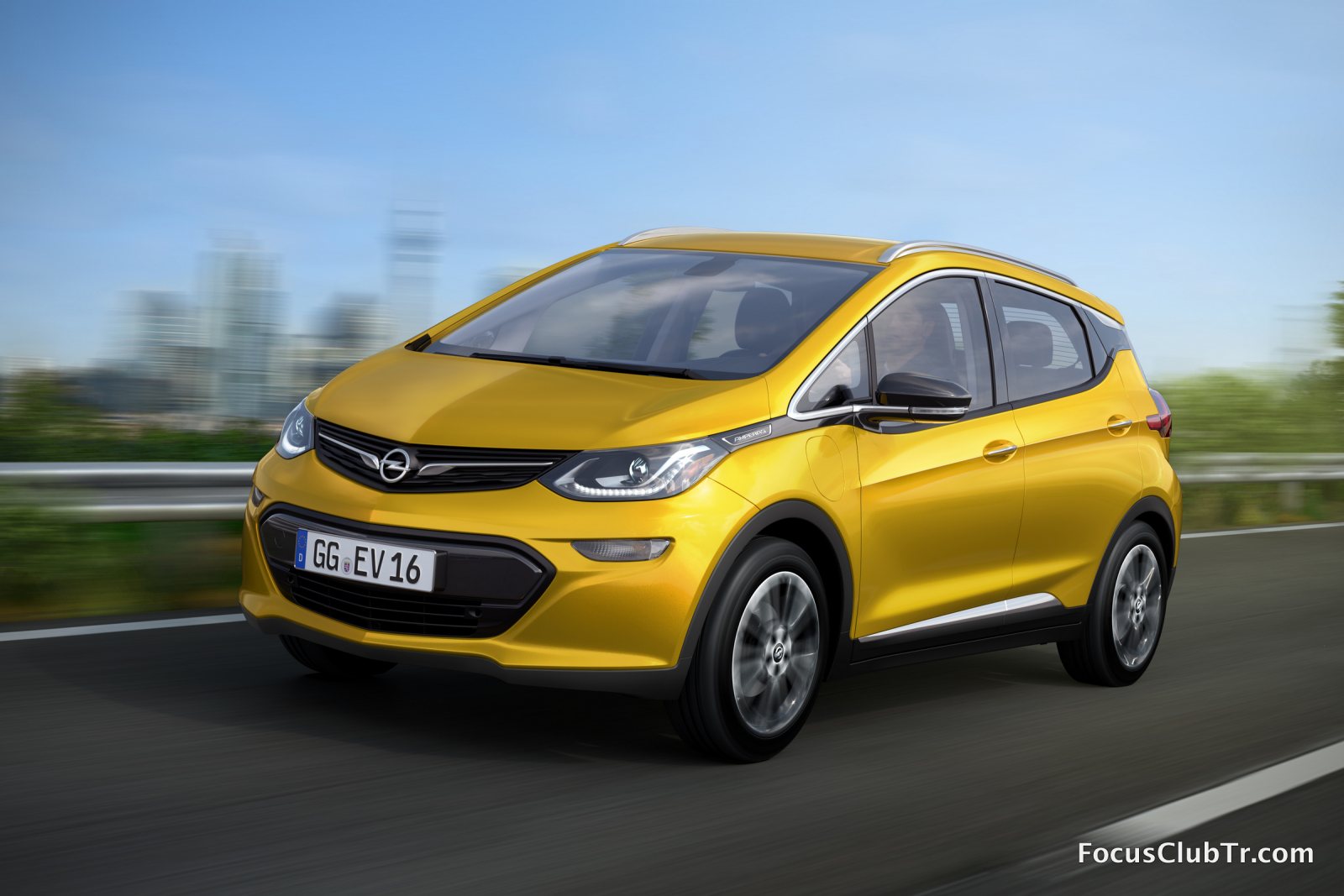
3 puanValla gecenin bir yarısı sokağı inleten eksoz sesiyle ve sesi sonuna kadar açılmış teybiyle beni ve ailemi rahatsız eden kim olursa olsun okkalı uzuuuuuun bir küfrü sesli olarak söylerim. İyi ki aşağıda değilim yoksa kesin arabasını durdurup kavga da ederdim diye içimden geçirirdim.3 puan2 puanAbi bu senin arabamı ? Bir de Bitüselfin yararı ne oluyor ses yada ısı yalıtımı gibi mi fotoğraflarda bana ince ve esnek aliminyum gibi geldi oda sesi geçirir diye düşündüm. Son olarak abi malzemeleri nereden temin edebilirim bilgin var mı ? Aynen sonrasında çok sinir edici bir tıkırtı oluşuyor inşallah bu yöntenleri uygulayınca düzelicek2 puan2 puanbenim kapılarda sound magus 206 ve 306 serisi var memnunum ... DLS- İNFİNİTY-FOCAL -VİBE Vs...2 puan2 puanBenimde bir an önce hoparlörleri değiştirip bu yalıtımı yaptırmam lazım araba 25.000 km ye geldi daha önce bu kadar ses gelmiyordu şimdi bas vururken irenç tıkırtı cızırtı sesleri geliyor, hoparlör tavsiyelerinizide bekliyorum arkadaşlar birsürü çeşit var kafam karışıyor.2 puanEvet, öyleymiş, Yakup Bey de yazmış. Teşekkür ederim. Teşekkür ederim Yakup Bey. Şu dokunmatik hassasiyetini biraz iyileştirseler gayet iyi olacakmış aslında. Mevcut ekranın kapasitif sensörleri çok daha hassas kullanıma müsait, sanırım yazılımdan dolayı basmatiğe dönüimüş. Belki yeni güncelleme ile biraz düzeltmişlerdir.2 puan2 puanbitüselfi dış kapı sacının iç tarafına firex süngeride iç kapı döşemelerinin arkasına uygularsan etkili sonuç alırsın öncesi sonrası ön çamurluk davlumbazının arka kısmı firex kaplamalı ön çamurlukların iç kısmı bitüself kaplanmış hali2 puanMustang fanatiği değilim ama görünce kıskandım desem yalan olmaz. Güzel günlerde kazasız, cezasız, arızasız kullanın.2 puan2 puan1 puanOpel’in elektrikli modeli Ampera-e’nin ilk resmi fotoğrafı yayınlandı “Car of the Year” jürisi tarafından 2012’nin en iyi otomobili seçilen, Opel’in ilk elektrikli modeli Ampera’nın-e versiyonun ilk resmi fotoğrafı yayınlandı. Gelecek yıl pazarlara sunulması planlanan Ampera-e modeli ile Opel’in hedefi daha az emisyon, daha uzun menzil! Detay: http://anasayfa.focusclubtr.com/opel-ampera-e-resmi-olarak-yayinlandi/
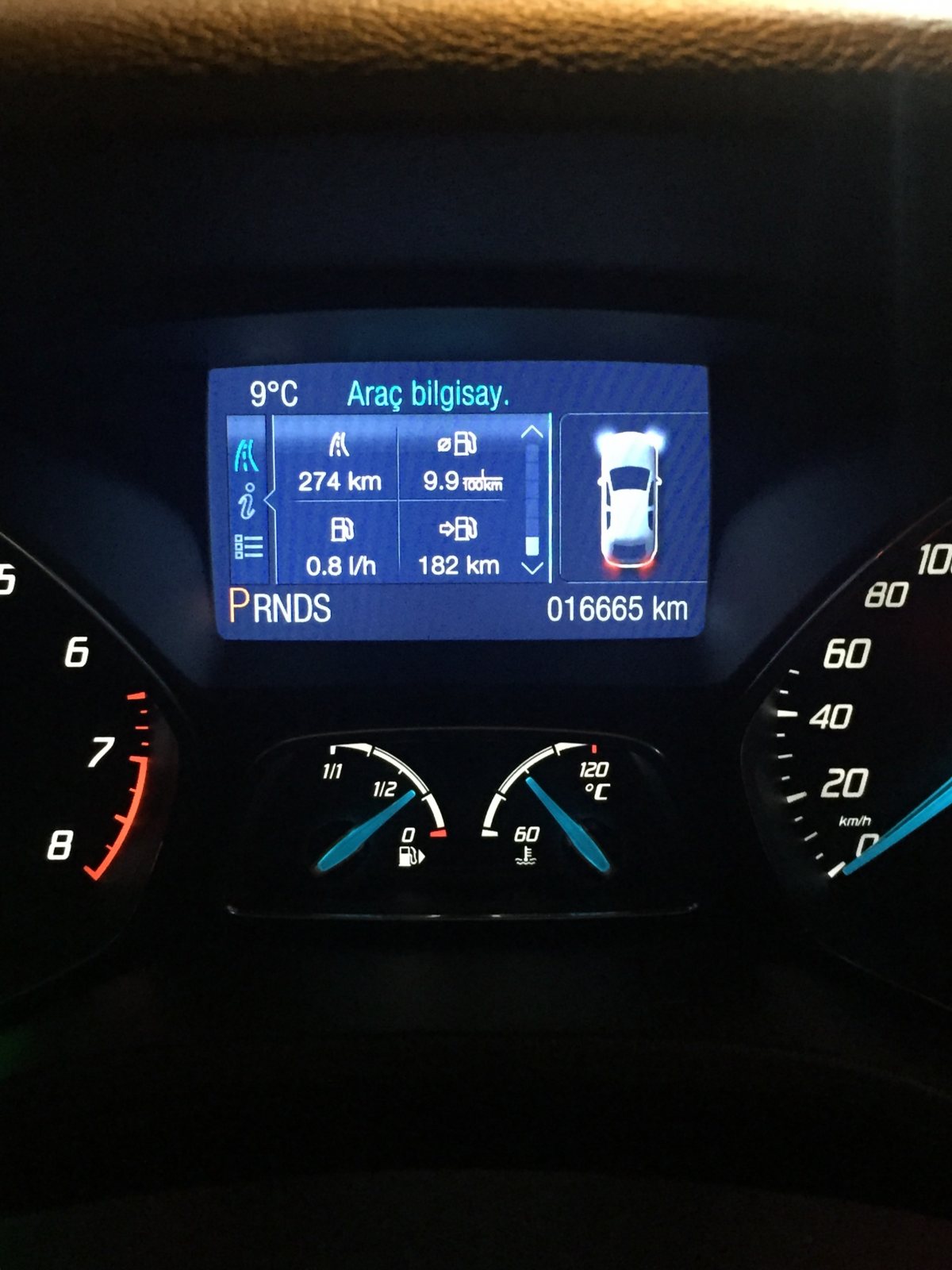
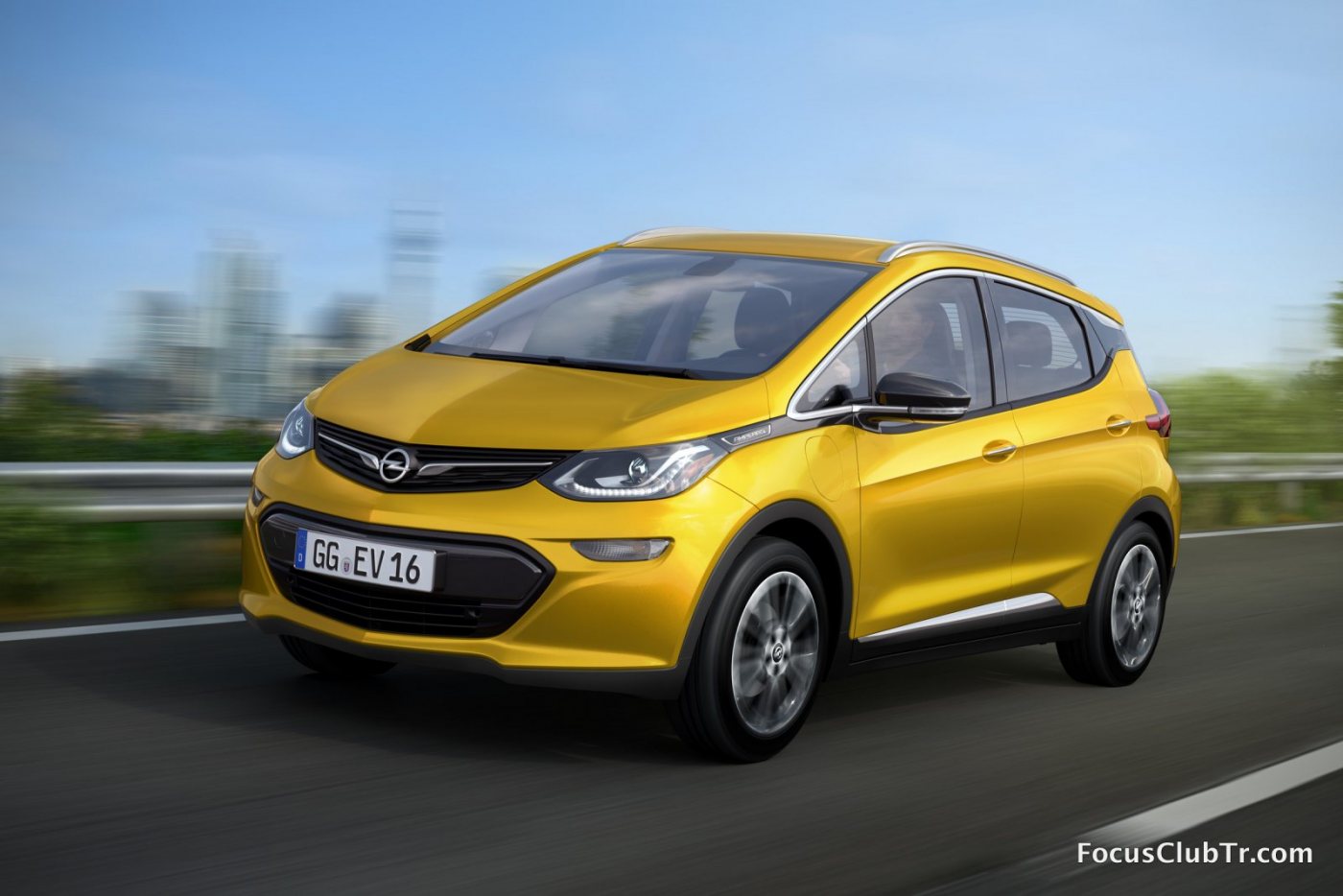 1 puan1 puan1 puan1 puanSaol abi valla yordum seni bugün inşallah hallederim en kısa sürede1 puan1 puanFirex tedarikçisi 1cm x1mx20m 230 tl gibi idi http://www.himerpa.com/prod/list.aspx?cid=46 bitüself için1 puan1 puanBu yaklaşım teknolojiyi inkar söylemine doğru ufaktan yol alır. Eskiden şu bu yoktu hala yaşıyoruz ifadesi biz şanslılar için geçerli ama şu anda eminim kaygan zeminde yeterince traksiyon sağlanamadığı için kazaya kurban giden rahmetli(ler) vardır. Yani eskiden kitle kırımı vardı şimdi yok gibi bir fark olmayacak hiç bir zaman. Kaza oranı katedilen her 100.000 km için belki 5'ten 2 veya 3'e düşmüştür, ama bu yarı yarıya azalmaya karşılık gelir. Gelişme bazen böyle küçük adımlarla olur. Sizin beceri ve zevkiniz doğrultusunda önerdiğiniz uygulama acemi biri için ölümcül olmasa bile sevimsiz bir kazaya neden olabilir.1 puanBuyrun kılavuz burada mevcut Hala netten aratın diyenler var yahu Saat ve tarih için: Menü tuşuna basın ve aşağıya doğru indirin orada ayar kısmı olacak1 puan1 puanbenim araba ben kendim uyguladım sağolsun sevdiğim bir arkadaşımla beraber bitüselfin önü öyle aliminyum gibi gözükür arkası ziftlidir ses yalıtımı için kullanılır yol sesi dışarı seslerinde bariz başarı sağladım kulağı titiz birisi olarak çıtırtı pıtırtı sıfır dizel olmasına rağamen motor sesi kabin içinde yok denecek kadar az devir yükselince geliyor firex 1metre eninde x 20 metre uzunluğunda 2 kişi alınırsa 2 araç yapılır komple bitüself ise 20 cm eninde x 5metre yada 10 metre olması lazım nette ankara bayileri var ürünlerin en uygun buralardan temin edebilirsin1 puan1 puanÇok teşekkür ederim, sizin de doğum gününüz kutlu olsun, "nice yaşlara" diyelim.1 puan1 puan1 puanOpelde dediğim şekilde. Astra sportu2012'de sıfır almıştım. Böyle bir özelliği 5-6 ay sonra tesadüfen tecrübe ederek öğrenmiştim. Sürüş güvenliğini riske atacak bir durum hiçbir zaman oluşmadı. Oldukça pratik. Böyle kullanmaya alışacağım artık Yakıttan olduğunu düşünüyorum bende. Çünkü aracı ilk aldığımda 50l tl'lik totalden mazot almıştım. 100km kullandıktan sonra lineaya mazot aldığımız yerden hesaplı mazotla fullemiştim. Çünkü geçen lineaya mazot alırken benle beraber yeni cmaxcı biri de mazot alıyordu. Herhalde dedim tdci motorlar mazotu seçmiyor. Malesef öyle değilmiş Astraya sürekli shell alırdım. Bir kere hem yol üstü diye hem de kendimce ekonomi yapacam diye full depo hesaplı mazot alıp uzun yola çıkmıştım. Benzer kullanım şartında 1200km menzil giden araç 1050'yi bile geçemedi. O zamandan sonra shell ve total dışında kullanmadım. 95binde motor kondisyonu çok iyi şekilde sattım. Bir daha focusa shell ve total harici asla mazot koymam.1 puanBizim araca çıkan bir güncelleme gözüküyor SYNC için. What's included in this update? EA5T-14D544-AD SYNC2 - V3.8 ABOUT THE LATEST UPDATE The new software update for SYNC® with MyFord Touch® systems includes all the improvements from previous updates, plus additional benefits such as: Siri® Eyes Free*: Now iPhone users can use Siri® Eyes Free with SYNC® with MyFord Touch®. With simple voice commands, SYNC® with MyFord Touch® enables you to operate the iPhone and SYNC® together. Siri® Eyes Free can be activated by pressing and holding the voice button for at least 3 seconds. Secure, simple phone pairing: Phone pairing is now easier. Automatic reconnection: If your phone disconnects, SYNC® with MyFord Touch® will automatically reconnect it. Easier entry of destinations for China: Now SYNC® with MyFord Touch® allows for easier entry of destinations. *Feature requires compatible hardware. The installation of this update will take up to 30 minutes to complete. Be sure to keep your engine running (not in accessory mode) throughout the entire installation process. Turning off your vehicle during the update installation will disrupt the process. Although your vehicle must be in park when you begin the installation process, you may drive your vehicle while the update is downloading to your SYNC® system. If your vehicle is equipped with the Intelligent Access with Push Button Start feature, you will need to temporarily disable the Automatic Engine Idle Shutdown (AEIS) component before beginning the installation in order to prevent your vehicle from timing out and shutting off the engine before the software update is complete. To disable this feature, use your steering wheel controls to navigate to the Settings menu on your left-hand Instrument Cluster LCD display. From there, select Vehicle >Auto Engine Off >Off. (If you do not see this setting, there is no need to make any changes before starting the update.) Alternatively, after initiating the installation, you may drive the vehicle during the update process to avoid shutting off the engine. The next time you start your vehicle, the AEIS will automatically reset to "On." Please note: During the update installation, SYNC® will temporarily appear to not recognize your mobile phone or media device. This is normal. Once your system has been successfully updated, SYNC® will display a notification stating "Installation complete." Fakat bir ibare mevcut güncellemeyi indirmeden önce. You have an update available. Please note you will need a USB drive in order to proceed. This update is compatible with A3, A4, A5, A6 and A7 SD cards only. If you're currently using an A1 or A2 SD card, request a new SD card by calling 800-392-3673. (First, choose your language preference; then select Option 3 > Option 1.) SDcard tipinize dikkat ediniz. Üstündeki harf ve rakam nedir. Mesela bu güncelleme bizi kapsamıyor. Çünkü bizdeki Sdcard "G2" Ayrıyaten güncelleme yaklaşık 30+ dakika sürebileceği için araç ayarlarından otomatik araç kapamayı kapamayı unutmayın. Olayı çözdüm sanırım. Anladığım kadarı ile SYNC sistemi güncellersem bizim sdcard ile uyumsuzluk yapacak. teknisyenimle konuştum aynnen öyleymiş1 puan1 puanHayırlı uğurlu olsun kazasız belasız binmeniz nasip olsun. Gördüğüm kadarıyla Custom Pack duruyor araç. Almanya'da biraz daha donanım yelpazesi değişiyormuş ama tam net bilgim yok. Aracın içi siyah ve kapıların içindeki deri döşeme ile camın önündeki kısım da deri olmalı aracınızda. Fren balatalarından geldiğine emin misiniz? Ani frenleme yaptınızmı? Çok sık trafikte dur kalk yaptınız mı? Duman ne kadardı? Bizim aracımızda böyle bahsettiğiniz kadar bir duman gözlemlenmedi fakat koku durumu oldu. O da normal.1 puanBende aynen o şekilde yapıyorum. Zaten alışkanlık var ,bir de 5 vitesten 6 vitese geçtim yadırgıyorum.1 puanAstra daki sistem gibi çalışmıyor maalesef durmaden önce Can res olması lazım tuşun adı ona basıyorum ben tekrar yürüyünce durmadan önce 6 da vites misal tekrar altıya atıyorum aynı tuşa tekrar basıyorum devam ediyorum, başka pratiği var olabilir varsa bilen biri mutlaka yazar [emoji4]1 puanHız sabitleme de Astradan örnek vermem gerekirse; Hafızadaki hız 100km/s diyelim. Önümüze ışık geldi durduk. Tekrar harekete geçtik. Vitesi 4 yapıp 80'e çıktım.Hafızadaki hıza tıkladığım an 4.vitesteyken araç 100km's hıza kendi geldi. Sonra 5.vitese atmak için debriyaja basıp vitesi 5'e attığımda kavrama gerçekleştiği an hız sabitleme aynen aktif devam ediyor. Herhangi bir yere tekrar basmıyorum. Bunu focusta yapamadım. Focusta debriyaja basıp vites değiştirdiğimde hız sabitleme devre dışı kalıyor.1 puan1 puanTamam abi araştırıyorum teşekkürler Aynen abi Firex sünger tam benim aklımda ki şey adını bilmiyordum saol1 puan1 puanİşin kötüsü arızalı kamera da adamın elinde. Kargo parasını kendim karşılayarak gönderdim. Kamera yok, para yok. Adamın insafına kaldık. Ama ders oldu, bundan sonra yurt dışından garantisiz pahalı elektronik ürün almam ders çıkarabilmek de iyi bişey değil mi.1 puan1 puan1 puanAbooo bizim sokakta bizim arabalar gidemiyor çukurdan. Sen ferrariyle geç sesimi bile çıkarmam.1 puanMerhaba arkadaşlar.Bugün Focus 2013 sedan aracımı servise götürdüm malum bu tıkırdamalar için.Gösterge paneli ve klima yuvasından seslerin geldiğini söyledim.Bir usta ile yola çıktık sesleri dinledik asfaltta ses çıkarmadılar bozuk yolda deneyelim dedik gösterge panelinden onların deyimiyle zırıltılar geldi ama klima yuvası bir türlü takırdamadı o da benim şansımdı heralde.Servise geri döndük gösterge panelinin sökülmesine karar verildi.Biraz uzun sürdü ama nihayetinde sorunu çözdüler.Bu gösterge panelindeki sürücü tarafı hava yastığının nikelajının atmasından kaynaklanıyor dediler ve hava yastığını ve nikelajını garanti kapsamında değiştirdiler.Bu işlemler 1500 tl etti ama garanti kapsamına girdiği için bir ücret ödemedim. Yola çıktım denedim gerçekten gösterge panelinden gelen ses kesilmişti bununla birlikte klima yuvası da takırdamıyor artık deli olmaktan bir nevi kurtuldum sanırım1 puanBenim arabanın 26krş yaktığı uzun yolda senin arabanın 19 krş yakmasını çok görmemek lazım.1 puanBu arada eksoz çıkışın üstüne kamera takmış bir tanıdığım var. Tam olarak yeri çakma ST eksozun üstüne. Tampon plastiğşne değil.1 puanEylül sonundan bu yana 1600TL yakıt tüketip 8558km yol yapmışım. şu durumda km başıma 18-19 kuruş arası tüketim yapılmış oluyor. ölçüm yaptığım bu aralık değerleri için yol bilgisayarı da 4,9lt/100km tüketim gösteriyor. Bu hesaba yaptığım yakıt alışverişlerinin toplamını yaptığım toplam yola bölerek ulaştım. YB bilgisi ise tabiki arabadan. (litre olarak verilere ulaşamadım, parasal veriye kredi kartı ekstrelerimden ulaştım) merak ettiğim ise; 95BG dizel 2015 model araç için bu tüketim değerleri gerçek mi yoksa hesapta yanılıyor olabilir miyim? daha önce küçük bir scooterım vardı ve o da kmde 19 kuruş benzin tüketirdi. şimdi kıyaslayınca bu hesap yanlış gibi geldi emin olamadım. arabayı yarı yarıya şehir içi/şehir dışı kullandım diyebilirim. şehir içinde de tasarruf amaçlı sakin kullanırım ama tasarruf olsun diye trafik katliamı yapacak seviyede değil genel olarak sakin kullanıyorum.1 puanArkadaşlarda 5 yaşında jetta var. Dikkat ettim onlarda ön arka var. Bir kaç modelde daha gördüm bu başlıktan sonra, renolarda yok ama.1 puan1 puanÜzme tatlı canını BMW 3.28i kullanıyorum modunda gez sende1 puan1 puanGidiş Petrol Ofisi POgaz Maltepe/IST 34.68LT * 2.15 = 74.56TL Güzargah Maltepe-Pendik ido ile yalova -> susurluk -> bandırma -> ç.kale Mesafe 453KM ort hız 108km/h ort yakıt 7.66lt/100km kilometre maliyeti 0.16TL Dönüş Total Lpg 34.53Lt * 2.48 = 85.63TL Güzargah Ç.kale-Lapseki -> Gelibolu - Tekirdağ - istanbul - maltepe Mesafe 411km ort hız 115km/h ort yakıt 8.4lt/100km Kilometre Maliyeti 0.20TL Not: Yıllarca lpg ye geçsem mi diye tereddüt ederken şu rakamları görmek neden daha önceden geçmedim dedirtti. hesaplama yol bilgisayarı hesabı değil depo fulleme ile yapıldı1 puan1 puanUstanın tavsiyesi üstüne Atiker Gold Kit Takdırdım ince simit tank ile. Performans açısından pek bişi fark etmedim, üst limitlerede çıkmadım zaten uzun yola çıkınca bakacaz o duruma. bagaj baya bi yükseldi 3-4cm yüksekliğin bu kadar etki edeceğini düşünmemiştim. yakında konu açar koyarım resimleri. geçen hafta sonu ilk kez test etme fırsatım oldu. benzinlideki gibi bazenaz yakayım demeden ctesi pazar istanbul gezintisi. yaklaşık 2-3 saat trafikte geçti Toplam Mesafe : 224km Ortalama Hız : 18km Harcanan Yakıt : 27.42lt POgaz (2.09TL fiyatı toplam 57.30TL) Ortalama : 12.24lt/100km Ne kadar yaktı : 57.30/224 = 0.25 TL aynı mesafeyi benzin ile kat etmiş olsaydım 12.24*0.9 = 11lt/100km yakacaktı, 4.23tl den kmde 0.46 TL ile yüzde 45.6 tasarruf sağlanmış oldu.1 puanDaha önceki aracımda da depo göstergesini çok kullanmıyordum. Açıkçası ne kadar bilgi verdiği şüpheli olduğu için ,en azından kalabalık yapmasın diye oraya koydurdum. Şuan kullanıyorum ,oda sadece ne kadar zamanda lpg'ye geçiyor vs ilk zaman hevesleri yani Zaten montajı basit ,çok elzem olursa dışarı alabilirim. Yakıt takibi yapmadan zaten 300km 'de bir depoyu dolduracağımdan bu şekilde istedim.1 puanaaa bende de bagajda çok ağır olmasda bir sopam var pek hoş görünmeyebilir ama bu yaştan sonra elin itlerinden dayak yiyecek halim yok, akıtırım beynini vallahi... şu tamponu deleni bulmam lazım çok orjinal planlarım var onun için. bu arada benim bagajımda da iki tüp şu lastiğin içini dolduran köpüklerden var. patlak çatlak olursa yolda diye. tavsiye ederim bence her arabada bulunmalı.1 puanBu görüşü takdirle karşılıyorum. Ancak araçlarda estetik kaygı ile yapılan pek çok şey aslında daha güçlü araçlarda işlevsel zorunluluk olarak yapılmışların taklidinden öteye geçmiyor. Söz gelimi 1XX PS'lik bir araca dörtlü egzos çıkışı veya dev bir arka kanat gibi. Bazen bu mış gibi durumları komik olabiliyor ve haliyle araç "apaçi" damgasını yiyor. Yapılacakları özenle seçmek lazım. Artı yapılacakların çevreyi rahatsız etmemesi ve zarar vermemesi lazım, maalesef yine yazıyorum mahalle aralarında egzosu bağırtarak gezenlerden kesinlikle hoşlanmıyorum ve buna cevaben ikinci bir çevrecilik dersi de beklemiyorum! Çevreye keyif için verilen zararlar annda önlenebilir, zorunluktan kaynaklananlar için de çözüm gayretleri biryesel, ulusal ve uluslararası düzeyde sürmektedir.1 puanThis leaderboard is set to Istanbul/GMT+03:00
















Önemli Bilgi
Bu siteyi kullanarak, forum Gizlilik Politikasını kabul etmiş olursunuz.